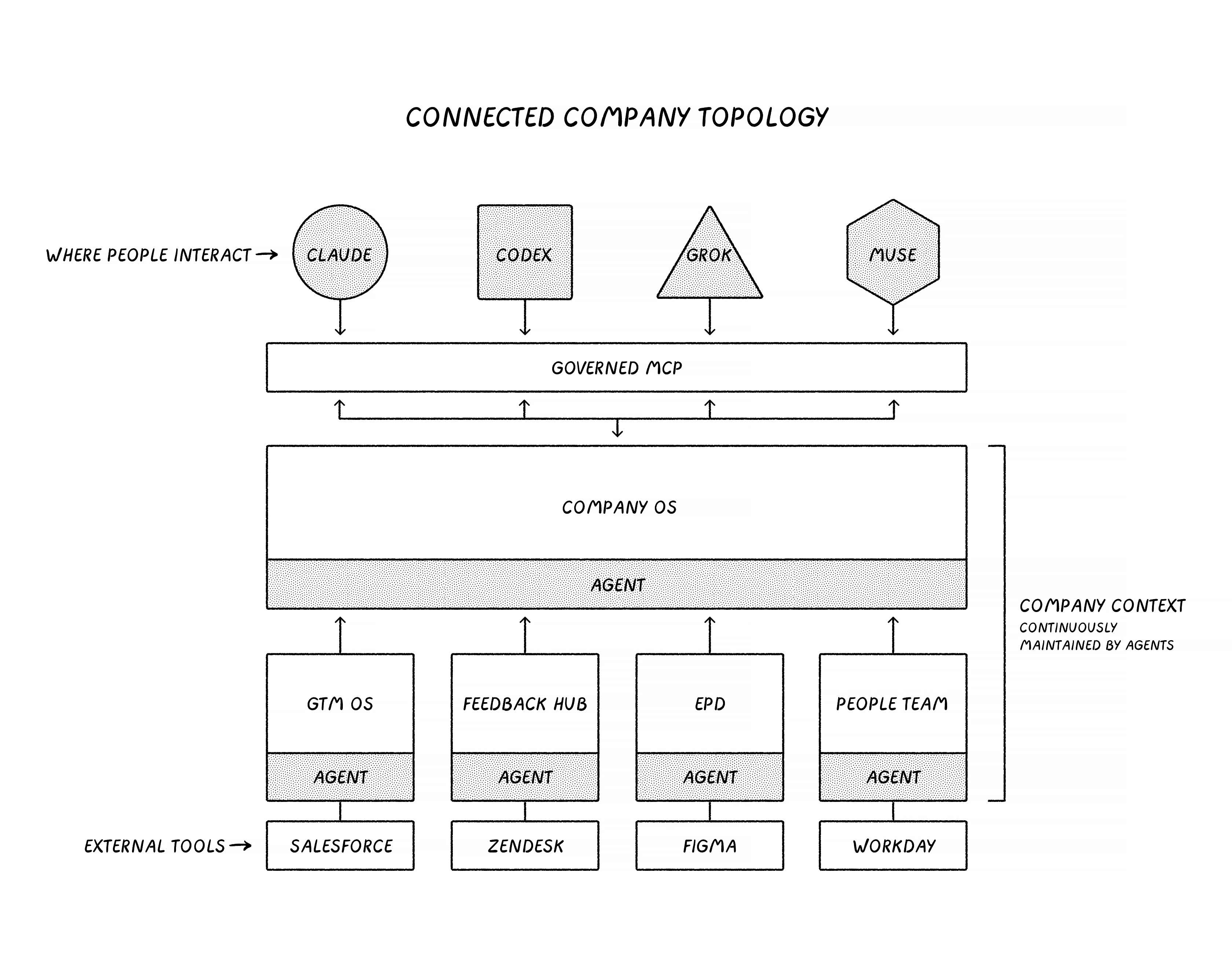
Notion’s argument for how a team gets real leverage from AI: stop treating AI as personal one-off chat, and build two shared things. First a context system, one governed place where the whole team and their agents read and write what the company knows. Second factories, shared agents for specific recurring jobs that a few people build and watch, and everyone else just uses. Source: A New Shape for Work by Notion Labs (about 10,000 words, October 2026). It is a vendor guide, so read the method separately from the sales pitch.
The opening image is a bicycle with a power boost but one gear: the pedals move fast, nothing fundamental changes. Leverage means working on the system, not in it.
The problem they diagnose
Seven symptoms, all traced to one cause (no shared context system): AI shows big gains in code but little elsewhere; a power user’s way of working does not spread; the agent cannot find things so you hesitate to ask; you re-brief it on background every time; lots of chatbot demos but little durable automation; you only trust the agent on scratch paper because real systems have no preview or audit; and hundreds of individually built agents with unknown access, risk and cost. Personal chat is “a computer without a hard drive”: stateless and single-player.
Part 1: the context system
Six jobs: store essential knowledge, keep it organised, govern it with permissions and version control, display it any way you want, support human collaboration, and work with any agent.
The practical advice, in the order they give it:
- Use structured storage, not scattered apps. Homegrown vibe-coded tools and stray Postgres databases fail on security, agent integration (search is not free), governance and collaboration. They want structured data, free-form documents and code to live together.
- Model your world (the “ontology”). Start small. Their own CompanyOS has six core databases: Projects, Tasks, Documents, People, Teams, Customers, linked by relations (a person’s manager, a project’s DRI). The payoff is navigation: an agent opens “Q4 2026” in a Quarterly Plans database and follows links to that quarter’s meetings, docs and tasks, instead of semantic-searching “Q4 roadmap” across hundreds of near matches. Even one-off things (document drafts and versions) get a little structure.
- Sync everything in. Give agents one governed access point rather than direct access to dozens of tools. Their reasons: fewer failure points, simpler governance, fewer tokens spent on each system’s quirks, and search quality is a full-time job. Managed syncs for common tools, AI-built custom syncs for the rest. Their name for it is a “context warehouse”.
- Make meetings first-class objects, linked to projects and people. Meeting transcripts are the richest context a team produces.
- Permissions by group, with row and column rules. A salary column hidden inside the People database beats a second private database; reviews visible only to their authors is a row rule.
- Validate on entry. Reject or flag bad input the way a form does, and use AI checks (does this memo answer the questions every memo must answer, is this filed in the right place, is the decision reflected on every page it touches).
- Cure context rot. Stale, misplaced, outdated context is “Enemy No. 1”, and agents can finally do the cleanup nobody had energy for.
Two framing lines worth keeping: “Rent the intelligence. Own the context.” (the model is swappable, the context is the asset), and the jagged-frontier point that no model is best at everything, so tying a workspace to one model vendor gets costlier over time.
Part 2: factories
A factory is an agent or set of agents that is:
- Specific: built for certain tasks, not a do-everything assistant.
- Shared: many people use the same one.
- Scrutinized: some people watch how it runs and fix it.
A personal agent with great memory is not a factory (not shared). A personal agent that can query the data warehouse is not a factory (nobody monitors it). A skill is a “proto-factory”: text is shared, but the agent, machine, connectors and other skills are not, so you cannot debug why it fails on someone else’s laptop.
Not a "dark factory"
They explicitly separate this from the “software factory” of fully unattended code. Factories cover any knowledge work, and humans choose where they take part. Their stated aim is to put people in positions of authority over the routine assembly line, not remove them.
Why shared beats personal (their list): duplicated setup, uneven quality, improvements that do not compound, turnover loss, and thin data to judge from (one team watching 1,000 runs a day beats 25 people watching 40 each). Their security argument is the strongest: when every person decides what their own agent can access, only the tail matters, because one badly configured agent is enough for harm. Two diagrams back the economics: with a team of 4, builders are 50 percent of the team’s time; with 36 people, two builders are 5.6 percent.
Fixed cost logic. One hundred people spending an hour each on their own slide-deck skill is 100 hours of shallow work; two people spending 25 hours each is half the time and 50 hours deep. Many personal agents are abandoned before they get good because no individual can rationally climb that far.
Triggers. Most company work starts either on a schedule (month-end close, weekly metrics) or on an event (support email, lead form). A chat is just an event a human noticed. Wake agents automatically on both.
The simplest possible factory (five minutes, they say)
- Create a “Slide Decks” database.
- Add a status column: to-do, doing, done.
- Create an agent that runs when a card is created with status to-do.
- The agent marks it doing, makes the deck, writes the link back and moves it to done.
- Share the database, and tell teammates’ personal agents (via skill or team instructions) to add a row when someone asks for a deck.
- Watch it, and fix the prompt when it fails.
The to-do board is the interface, the log and the audit trail at once.
Four steps for a real one
- Notice. Good candidates are recurring, verifiable, stable, aiming at average quality rather than outlier creativity, purely digital, working from a known body of information, and cheap or easy to detect when wrong. Their examples: support email answering, newsletter QA, dependency updates, minor bug fixes, data questions, weekly project updates, sales follow-up, feedback triage, onboarding, invoice and expense processing.
- Plan. Plan with a personal agent. Start simple, run it, watch it fail, then fix real failures instead of pre-empting imagined ones (“we are bad at predicting how factories fail”). Hybrid hosting: keep tasks, statuses, artifacts, run history, prompts and evals in a malleable context platform, and run the agents wherever you like.
- Run. Earn trust in stages. Shadow runs: draft the email, state what the CRM edit would have been, do nothing real. Volume control: a tiny sample, one pasted email, or a couple dozen test emails first.
- Improve. Keep prompts in a Prompt Versions database (status: testing, production, retired; one per pipeline step), and write down the tasks you want it to excel at and the criteria for judging them, which is what evals are. Reason: fixing headline length can quietly shorten other text. Git and staging are overkill for most.
How it fits with what the vault already holds
- Context: this is Context Engineering and Agent Memory scaled from one agent to a company. The ontology advice matches the vault’s own index and MOC approach; a structure that lets an agent navigate instead of search.
- Personal versus shared: Personal Agent Operating Rules and Goal-First Agent Automation are single-person recipes. This page is the argument for the next step, and its “scrutinized” criterion is the team-level monitoring that single-person setups (even with audits and regression tests) do not have.
- Staged trust: shadow runs and sampled volume are the team version of earned autonomy in Personal Agent Operating Rules and of Human-in-the-Loop as a Tool Call. The prompt-versions-plus-evals loop is Eval-Driven Agent Development in a light form; see also Capability vs Regression Evals.
- Fleets: Agent Fleet for Business Automation is the same shape from a small company with a different runtime.
- Skills: compare Fat Skills Fat Code Thin Harness and Skillify - Meta-Skill Pattern, where the skill is the unit; here the unit is a shared running agent.
- Term clash: “factory” here is not Software Factory (David Zhang’s intent-and-behavior inspection for code). Different idea, same word.
Tensions and caveats
A vendor guide
Notion sells the context system. Every recommendation ends at “put it in a flexible workspace with granular permissions and an agent API”, and the guide says “rent the intelligence, own the context” while advising you to concentrate that context in one product. That is lock-in on a different layer. No customer data, costs, failure rates or measured gains are given; “ten or a hundred times more work” and “five minutes to set up” are assertions.
- One store is one target. If everyone’s agent reads from and writes to the same place, a poisoned or prompt-injected document, or one over-permissioned agent, reaches everything. The guide mentions governance but does not discuss injection, write-access limits for agents, or memory poisoning. Read Agent Security and Threat Model next to it.
- “Sync everything” has costs it skips. Data duplication, sync lag (the stale-cache failure from Personal Agent Operating Rules), and sensitive data landing in a place it was not meant to be.
- Agents curing context rot can cause it. Autonomous cleanup needs the same review it is meant to replace.
- The “scrutinized” claim is the crux, and it is people-hungry. Someone must review samples forever. The guide does not cost that work.
- Fit criteria and examples disagree. The candidate list says mistakes should be cheap or easy to detect, yet the examples include autonomous customer support and agent-merged bug fixes with only “adversarial review agents” as the check.
- Shared skill debugging is solvable too. The case against skills assumes you cannot observe how they run. Logging and trace sharing in a harness would address part of that without a central agent (compare Session Observability and Replay).
- Not tried here. None of the Notion features (custom agents, worker syncs, MCP) were used.
Related
- Personal Agent Operating Rules
- Goal-First Agent Automation
- Agent Fleet for Business Automation
- Software Factory
- Context Engineering
- Notion Labs
- Knowledge Factory: the maintenance loop for the knowledge such factories depend on; a flag tool plus a background curator agent, keeping data access guidance instead of data copies